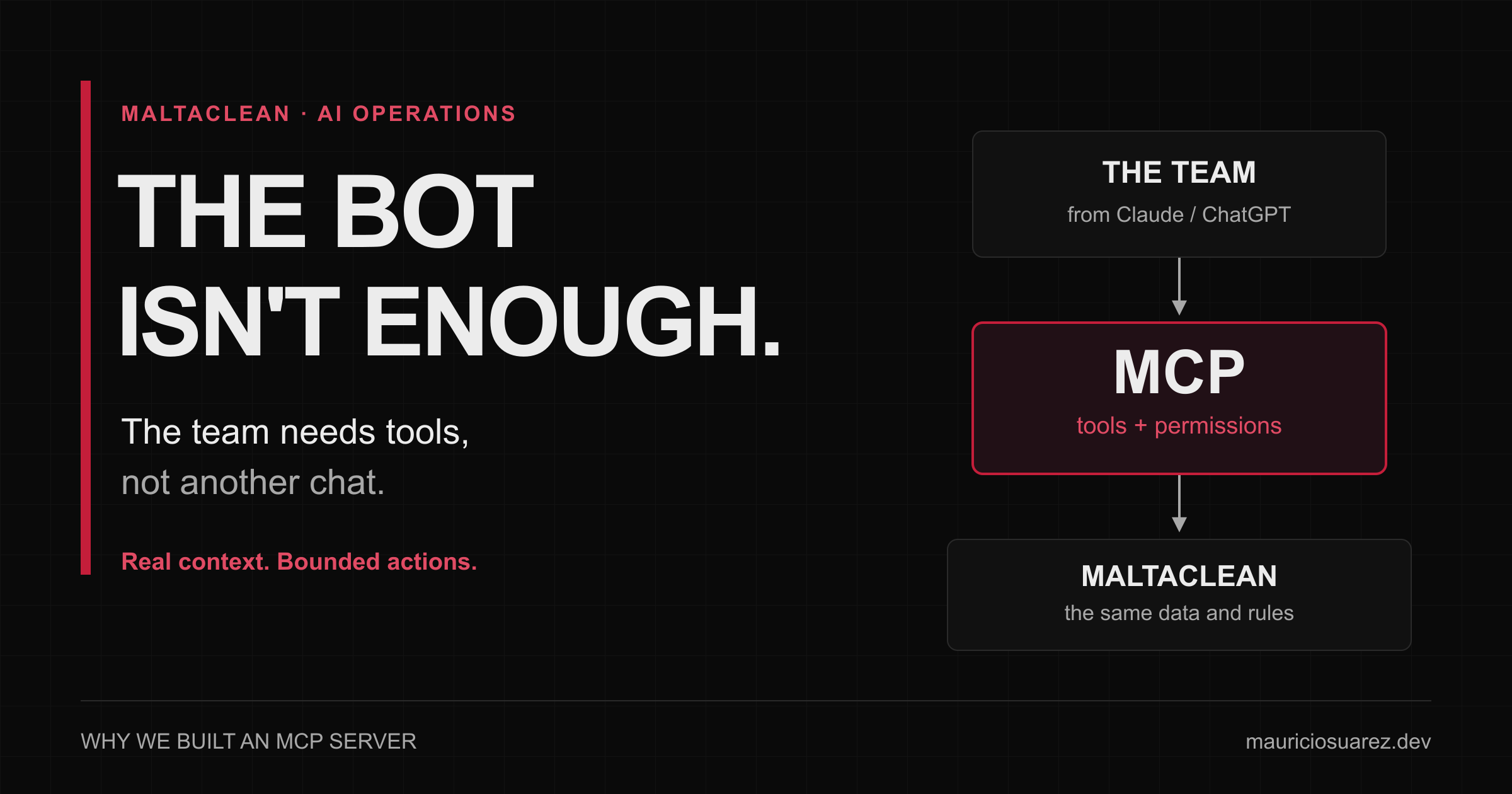
AI writes you a flawless reply. You’re still switching between screens to find out whether you can send it.
Imagine a customer asks to reschedule a cleaning. Before replying, you need to find the right booking, read what was agreed, check its status, and find out whether someone else is already handling the case. The model can help with the wording. But if you have to bring it all those facts by hand, you’re also its integration layer.
You copy the history. Explain the rules. Correct an assumption. Go back to the portal. Check that nothing has changed.
We have models capable of reasoning about an operation, and humans acting as the cable between the model and the business.
At MaltaClean, we decided to build that cable: an MCP server that lets operators and admins access operational context from Claude or ChatGPT and, with explicit delegation, access specific actions.
The interesting part wasn’t getting AI to see a tool. It was deciding what it could do with it.
We didn’t need another chat
MaltaClean already had a WhatsApp concierge, bookings, pricing, and operational portals. We didn’t want to build a second chat application or duplicate the business rules inside another agent.
We wanted to answer the team’s questions:
What needs attention? What did we discuss with this customer? Which price applies? How do I prepare a reply or a change without bypassing the existing process?
These are illustrative examples of the workflow we designed, not messages taken from customers.
MCP—Model Context Protocol—standardizes how an AI client discovers and calls tools in another system. For us, it’s the interface between Claude or ChatGPT and narrowly defined MaltaClean functions. It isn’t the model, doesn’t replace the database, and doesn’t grant permissions on its own.
We could have built a separate integration for each client. We chose MCP because we wanted to keep business contracts in the backend and expose them through a common interface. Switching clients shouldn’t require us to rewrite how a conversation is queried or a booking is validated.
The decision was deliberately small: Pages Functions alongside the existing backend, without another chat runtime. Another doorway into the business, not another business behind the door.
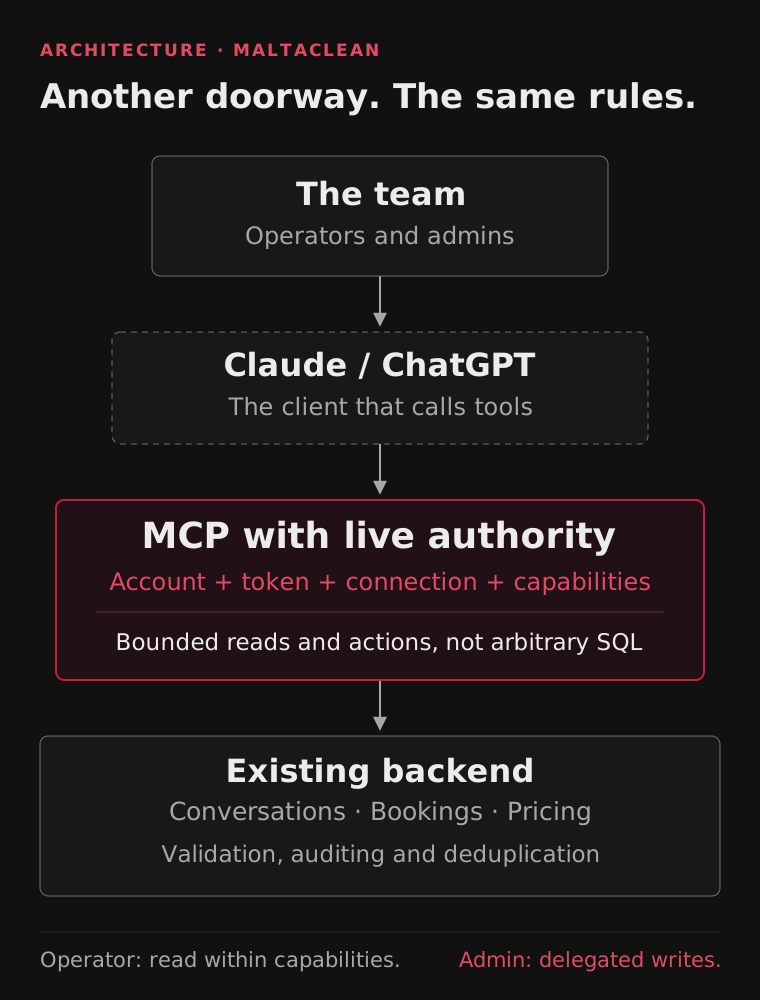
The AI client changes how people ask for help. It doesn’t replace permissions or business rules. This is an architecture diagram, not a productivity measurement.
We started by reading, not giving orders
The first published version had three tools:
list_attention: query pending work, with explicit priority and coverage.get_conversation_context: read a conversation’s messages and permitted operational context.get_prices: query the pricing catalog and calculations from their sources.
That supports a more useful workflow than pasting a block of text into a chat: ask what needs attention, open a case, and discuss a reply with the relevant context.
But reading has consequences of its own. Opening a conversation shouldn’t mark it as handled, claim it for the operator, or overwrite a draft. An assistant that only reads can still get in the way if a query triggers hidden effects.
We didn’t want a tool for “execute any SQL,” either. The catalog should describe tasks, not grant generic access to infrastructure. Reading prices doesn’t authorize changing them; reading a booking doesn’t authorize modifying payments or payroll.
Operators retain read access according to their capabilities. MCP writes are reserved for admins with the relevant permissions and delegation. That doesn’t change the sending permissions those people already have in the portal.
A prettier reply isn’t the benefit we’re after
The benefit we’re seeking is less work reconstructing a case before anyone can make a decision.
Less context carried by hand. The conversation comes from operational sources, with references and limits, rather than depending on what someone managed to copy.
A more natural way into the work queue. The team can ask a question and request details about a case. Priority still needs a reason: an old unanswered request matters, even if it doesn’t look like a new sale.
One authority for the rules. An operation prepared through MCP follows the same canonical paths that handle pricing, state, deduplication, and side effects. We didn’t want an AI-created booking to forget a rule that the portal enforces.
More narrowly scoped delegation. We can separate reading, sending, creation, and updates, then check authority again before acting.
I don’t have a defensible figure for hours saved or sales recovered through this MCP server. These are design benefits that still need to be measured in real work. A functioning integration doesn’t prove that the team serves customers better.
And that’s where the challenges a demo usually leaves out begin.
“It’s published” doesn’t mean “you can use it”
When we added writes, the server began advertising six permissions: three for reading and three new ones for sending messages, creating bookings, and updating them.
It seemed reasonable to expect the tools to appear immediately in every client. It wasn’t that simple.
During verification, we found a Claude connection with all six permissions granted, while the catalog we saw in the client still showed only three tools. The ChatGPT connection, meanwhile, had requested and received read access only.
In isolated SDK tests, an admin delegation with all six permissions listed nine tools: three for reading, three for replies, and three for booking operations. That didn’t prove that every real session was using that delegation or had refreshed its catalog.
We had to separate four questions:
- Does the server support the permission?
- Did this connection request and receive it?
- Are the session and client using that delegation and showing the corresponding tools?
- Did the action execute with the expected result?
A “yes” to the first doesn’t answer the other three.
The easy way out would have been to add write permissions to old connections. It would also have been wrong: if someone authorized reading, a server update can’t turn that consent into permission to send messages or modify bookings.
That’s why effective permissions are the intersection of what the token carries, what the connection still grants, and what the account can do now. A visible tool isn’t a permanent credential, either: identity and authorization are checked again before its effects.
OAuth was a user experience problem, too
Login worked. Getting back from login didn’t always work.
Navigation from Claude or ChatGPT can arrive without the session cookie because it comes from another site. With a SameSite=Strict cookie, that can happen even when the admin is already logged into the portal. In the workflow we reproduced, the user had to enter the portal and go back to continue authorization.
Removing cookie protections or handing the session to JavaScript isn’t a good fix. We corrected the return to the consent flow, preserving the original OAuth request and validating that the destination was an allowed internal route. Authorizing or denying access remained an explicit decision.
We also had to validate discovery, PKCE, and the documents clients use to identify their callbacks. “The SDK supports OAuth” was a starting point, not proof that our complete workflow worked.
The lesson: security that breaks the user’s journey ends up looking like a permissions failure. We had to fix the journey without weakening security.
Giving context doesn’t mean uploading the whole company to the model
We could send a contact’s entire history. We could also send only a summary. Neither extreme solved the problem well.
The full history adds cost, latency, and data exposure. A summary can lose an important agreement or fall behind the latest messages.
We chose an anchored, correctable summary of older context, a recent window of 30 individual messages, and paginated access to the originals when something needs checking. The query also gathers evidence by phone across different provider threads; the latest thread doesn’t always contain the full story.
The limits need to be visible. If a query returns a bounded set of bookings with no matches, that doesn’t prove the customer has never booked. A summary doesn’t verify a payment or become a source of pricing, either.
And customer messages are data, not instructions for the assistant. A sentence in the history can’t grant permissions or change an operation’s authorized recipient.
MCP doesn’t remove the privacy questions. Queried data reaches the AI client’s provider. We need to review the account, its terms, and what information the case actually requires. We don’t return secrets, private media links, or financial information unrelated to the task.
The right action can still arrive too late
Now imagine an admin prepares a reply. Before it’s sent, a new message arrives or a colleague takes ownership of the case.
The text can still sound good while answering a situation that no longer exists.
That’s why we separate preparing, executing, and querying the result. Preparation freezes an operation with its content and references. Execution receives that reference, not a replacement phone number or text. Before the effect, the system checks permissions, ownership, and applicable revisions; if something changed, it can reject the operation.
Bookings work similarly: a prepared proposal isn’t a created booking. Execution goes through the canonical validators and writers again. AI doesn’t get a shortcut to invent duration, staffing, or prices.
The most uncomfortable case is an uncertain result. If the provider might have accepted the message but its response was lost, “try again” can duplicate the message. The system must preserve the state and require reconciliation, not reward the model for persistence.
Accepted isn’t delivered. Delivered doesn’t prove a useful answer. And authorizing a connection doesn’t prove that a person reviewed every text.
Those distinctions are less eye-catching than a “make the booking” demo. They’re also what makes it possible to trust one.
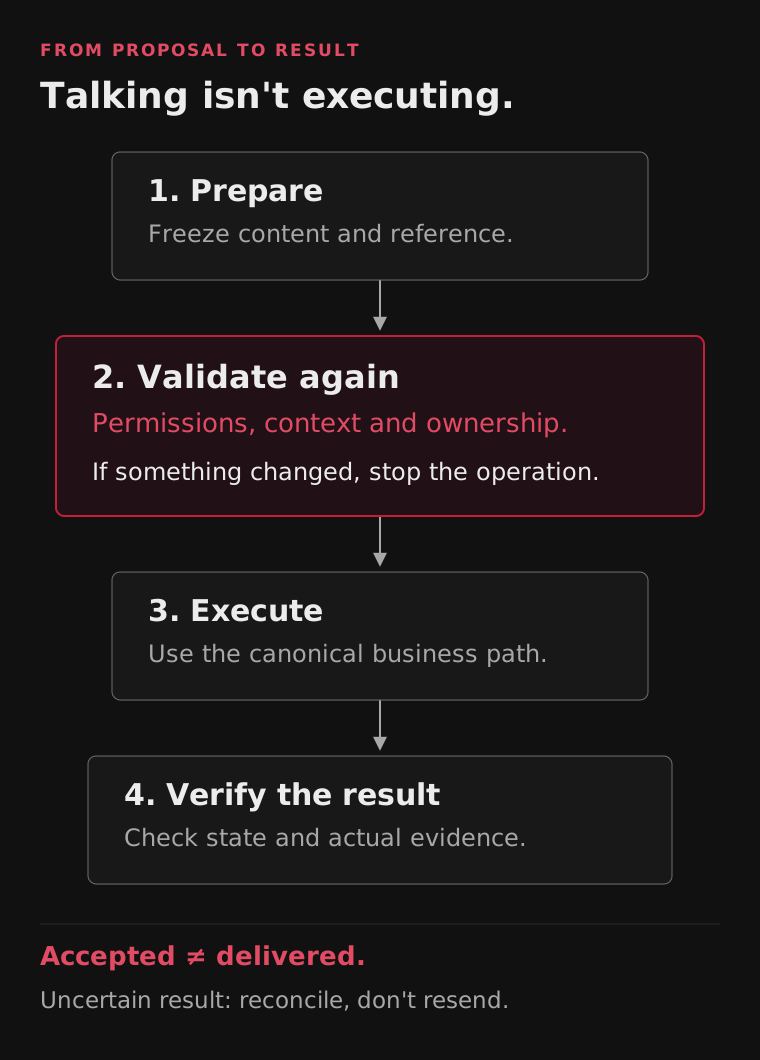
A prepared operation isn’t an executed operation. Provider status doesn’t replace delivery evidence, and an uncertain result doesn’t authorize another attempt.
What’s deployed, and what I still don’t consider proven
At the end of this experience, the backend with reads and delegated writes was deployed. We verified the six permissions in production discovery and the connections’ persisted delegations. Isolated tests verified the nine-tool catalog under a full grant.
That didn’t complete acceptance in Claude and ChatGPT: the actual authenticated catalog and the complete operational workflow still needed verification. We didn’t create bookings or send messages to customers to manufacture a green check.
Direct text sending remained restricted to an authorized test contact. Booking operations have their own canonical effects—including notifications—and don’t automatically inherit that restriction. Calling them from a chat doesn’t make them a harmless experiment.
The next useful measure isn’t how many tools we managed to list. It’s whether the team can handle a real case with less manual reconstruction, without duplicating actions, and with enough evidence to know what happened.
MCP’s value is in what it won’t let you bypass
I’ve already written in Spanish about why a correctly detected exception can go unhandled and about why the model interprets, but code authorizes actions.
This project joins the two: bring pending work closer to a human and give them useful tools, without turning an AI conversation into a back door to the business.
If the team is still copying context between screens, perhaps the next step isn’t another model. But if the system doesn’t yet have well-defined operations, putting MCP in front won’t create them. It will only make the disorder easier to invoke.
We didn’t build an MCP server to make AI look smarter. We built it to connect its help to real work, without disconnecting that work from its rules.
Status and verification described as of October 7, 2026. Productivity benefits are not quantified; deployment and isolated tests do not replace authenticated acceptance or delivery evidence.